#include <stdio.h>
#include <stdlib.h>
#include <string.h>

// To convert a-f or A-F to a decimal number
int chartoint(int c)
{
    char hex[] = "aAbBcCdDeEfF";
    int i;
    int result = 0;

    for(i = 0; result == 0 && hex[i] != '\0'; i++)
    {
        if(hex[i] == c)
        {
            result = 10 + (i / 2);
        }
    }

    return result;
}

unsigned int htoi(const char s[])
{
    unsigned int result = 0;
    int i = 0;
    int proper = 1;
    int temp;

    //To take care of 0x and 0X added before the hex no.
    if(s[i] == '0')
    {
        ++i;
        if(s[i] == 'x' || s[i] == 'X')
        {
            ++i;
        }
    }

    while(proper && s[i] != '\0')
    {
        result = result * 16;
        if(s[i] >= '0' && s[i] <= '9')
        {
            result = result + (s[i] - '0');
        }
        else
        {
            temp = chartoint(s[i]);
            if(temp == 0)
            {
                proper = 0;
            }
            else
            {
                result = result + temp;
            }
        }

        ++i;
    }
    //If any character is not a proper hex no. ,  return 0
    if(!proper)
    {
        result = 0;
    }

    return result;
}

int main(void)
{
    char *endp = NULL;
    char test[20];

    printf("\nEnter a hexadecimal pattern : ");
    scanf("%s",test);
    if(htoi(test) == 0)
    {
        printf("\nEntered characters not proper Hexadecimal Number!!!\n");
        exit(0);
    }
    printf("Hex : %s\tDecimal: %d\n" ,test, htoi(test));
}
Sunday, August 22, 2010
Hexadecimal to Integer Conversion in C
A simple implementation of converter which converts hexadecimal string to an integer.

Thursday, August 19, 2010
IPC Shared Memory Implementation in C
A simple Implementation of Shared Memory in C
Shared Memory is a type of IPC where the two processes share same memory chunk and use it for IPC. One process writes into that memory and other reads it.
After running the Server you can see the attached Shared Memory
After running the client the memory is freed.
Shared Memory is a type of IPC where the two processes share same memory chunk and use it for IPC. One process writes into that memory and other reads it.
After running the Server you can see the attached Shared Memory
vgupta80@linux unixprog> ipcs -m

------ Shared Memory Segments --------
key        shmid      owner      perms      bytes      nattch     status
0x0000162e 65537      vgupta80  666        27         1
After running the client the memory is freed.
------ Shared Memory Segments --------
key        shmid      owner      perms      bytes      nattch     status
0x0000162e 65537      vgupta80  666        27         0
//SHMServer.C
#include <sys/types.h>
#include <sys/ipc.h>
#include <sys/shm.h>
#include <stdio.h>
#include <stdlib.h>

#define MAXSIZE     27

void die(char *s)
{
    perror(s);
    exit(1);
}

int main()
{
    char c;
    int shmid;
    key_t key;
    char *shm, *s;

    key = 5678;

    if ((shmid = shmget(key, MAXSIZE, IPC_CREAT | 0666)) < 0)
        die("shmget");

    if ((shm = shmat(shmid, NULL, 0)) == (char *) -1)
        die("shmat");

    /*
     *      * Put some things into the memory for the
     *        other process to read.
     *        */
    s = shm;

    for (c = 'a'; c <= 'z'; c++)
        *s++ = c;


    /*
     * Wait until the other process
     * changes the first character of our memory
     * to '*', indicating that it has read what
     * we put there.
     */
    while (*shm != '*')
        sleep(1);

    exit(0);
}
//SHMClient.C

#include <sys/types.h>
#include <sys/ipc.h>
#include <sys/shm.h>
#include <stdio.h>
#include <stdlib.h>
#define MAXSIZE     27

void die(char *s)
{
    perror(s);
    exit(1);
}

int main()
{
    int shmid;
    key_t key;
    char *shm, *s;

    key = 5678;

    if ((shmid = shmget(key, MAXSIZE, 0666)) < 0)
        die("shmget");

    if ((shm = shmat(shmid, NULL, 0)) == (char *) -1)
        die("shmat");

    //Now read what the server put in the memory.
    for (s = shm; *s != '\0'; s++)
        putchar(*s);
    putchar('\n');

    /*
     *Change the first character of the
     *segment to '*', indicating we have read
     *the segment.
     */
    *shm = '*';

    exit(0);
}
IPC Message Queue Implementation in C
A simple implementation of IPC Message Queues.
IPC_msgq_send.c adds the message on the message queue .
IPC_msgq_rcv.c removes the message from the message queue.
To use this program first compile and run IPC_msgq_send.c to add a message to the message queue. To see the Message Queue type ipcs -q on your Unix/Linux Terminal.

Now compile and run IPC_msgq_rcv.c to read the message from the Message Queue.
To see that you have read the message again use ipcs -q

IPC_msgq_send.c adds the message on the message queue .
IPC_msgq_rcv.c removes the message from the message queue.
To use this program first compile and run IPC_msgq_send.c to add a message to the message queue. To see the Message Queue type ipcs -q on your Unix/Linux Terminal.

Now compile and run IPC_msgq_rcv.c to read the message from the Message Queue.
To see that you have read the message again use ipcs -q

//IPC_msgq_send.c

#include <sys/types.h>
#include <sys/ipc.h>
#include <sys/msg.h>
#include <stdio.h>
#include <string.h>
#include <stdlib.h>
#define MAXSIZE     128

void die(char *s)
{
  perror(s);
  exit(1);
}

typedef struct msgbuf
{
    long    mtype;
    char    mtext[MAXSIZE];
};

main()
{
    int msqid;
    int msgflg = IPC_CREAT | 0666;
    key_t key;
    struct msgbuf sbuf;
    size_t buflen;

    key = 1234;

    if ((msqid = msgget(key, msgflg )) < 0)   //Get the message queue ID for the given key
      die("msgget");

    //Message Type
    sbuf.mtype = 1;

    printf("Enter a message to add to message queue : ");
    scanf("%[^\n]",sbuf.mtext);
    getchar();

    buflen = strlen(sbuf.mtext) + 1 ;

    if (msgsnd(msqid, &sbuf, buflen, IPC_NOWAIT) < 0)
    {
        printf ("%d, %d, %s, %d\n", msqid, sbuf.mtype, sbuf.mtext, buflen);
        die("msgsnd");
    }

    else
        printf("Message Sent\n");

    exit(0);
}
//IPC_msgq_rcv.c

#include <sys/types.h>
#include <sys/ipc.h>
#include <sys/msg.h>
#include <stdio.h>
#include <stdlib.h>
#define MAXSIZE     128

void die(char *s)
{
  perror(s);
  exit(1);
}

typedef struct msgbuf
{
    long    mtype;
    char    mtext[MAXSIZE];
} ;


main()
{
    int msqid;
    key_t key;
    struct msgbuf rcvbuffer;

    key = 1234;

    if ((msqid = msgget(key, 0666)) < 0)
      die("msgget()");


     //Receive an answer of message type 1.
    if (msgrcv(msqid, &rcvbuffer, MAXSIZE, 1, 0) < 0)
      die("msgrcv");

    printf("%s\n", rcvbuffer.mtext);
    exit(0);
}
SCTP Server Client Implementation in C
Here's a simple implementation of SCTP server and client in C
This is how the connection is established :

The Client initiates the connection with an INIT packet . Server replies back by sending the INIT-ACK.
This packet also contains a unique context which identifies this connection. This context is called as COOKIE. The client then responds with a COOKIE-ECHO with the cookie sent by the server.
Now the server allocates the necessary resources required by the connection and replies back to the client with COOKIE-ACK.
And this is how the connection is terminated.

This is a detailed connection diagram for this program is as follows
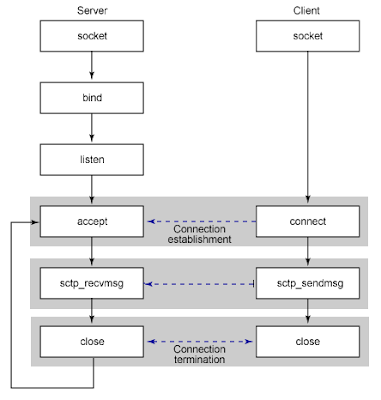
Note: To compile this code, sctp dev libraries are needed .
For ubuntu : sudo apt-get install libsctp-dev
This is how the connection is established :

This packet also contains a unique context which identifies this connection. This context is called as COOKIE. The client then responds with a COOKIE-ECHO with the cookie sent by the server.
Now the server allocates the necessary resources required by the connection and replies back to the client with COOKIE-ACK.
And this is how the connection is terminated.

This is a detailed connection diagram for this program is as follows

//SCTPServer.C To compile - gcc sctpserver.c - o server - lsctp
#include <stdio.h>
#include <stdlib.h>
#include <string.h>
#include <unistd.h>
#include <time.h>
#include <sys/socket.h>
#include <sys/types.h>
#include <netinet/in.h>
#include <netinet/sctp.h>
#define MAX_BUFFER 1024
#define MY_PORT_NUM 62324 /* This can be changed to suit the need and should be same in server and client */

int
main ()
{
  int listenSock, connSock, ret, in, flags, i;
  struct sockaddr_in servaddr;
  struct sctp_initmsg initmsg;
  struct sctp_event_subscribe events;
  struct sctp_sndrcvinfo sndrcvinfo;
  char buffer[MAX_BUFFER + 1];

  listenSock = socket (AF_INET, SOCK_STREAM, IPPROTO_SCTP);
  if(listenSock == -1)
  {
      printf("Failed to create socket\n");
      perror("socket()");
      exit(1);
  }

  bzero ((void *) &servaddr, sizeof (servaddr));
  servaddr.sin_family = AF_INET;
  servaddr.sin_addr.s_addr = htonl (INADDR_ANY);
  servaddr.sin_port = htons (MY_PORT_NUM);

  ret = bind (listenSock, (struct sockaddr *) &servaddr, sizeof (servaddr));

  if(ret == -1 )
  {
      printf("Bind failed \n");
      perror("bind()");
      close(listenSock);
      exit(1);
  }

  /* Specify that a maximum of 5 streams will be available per socket */
  memset (&initmsg, 0, sizeof (initmsg));
  initmsg.sinit_num_ostreams = 5;
  initmsg.sinit_max_instreams = 5;
  initmsg.sinit_max_attempts = 4;
  ret = setsockopt (listenSock, IPPROTO_SCTP, SCTP_INITMSG,
      &initmsg, sizeof (initmsg));

  if(ret == -1 )
  {
      printf("setsockopt() failed \n");
      perror("setsockopt()");
      close(listenSock);
      exit(1);
  }

  ret = listen (listenSock, 5);
  if(ret == -1 )
  {
      printf("listen() failed \n");
      perror("listen()");
      close(listenSock);
      exit(1);
  }

  while (1)
    {

      char buffer[MAX_BUFFER + 1];
      int len;

      //Clear the buffer
      bzero (buffer, MAX_BUFFER + 1);

      printf ("Awaiting a new connection\n");

      connSock = accept (listenSock, (struct sockaddr *) NULL, (int *) NULL);
      if (connSock == -1)
      {
 printf("accept() failed\n");
        perror("accept()");
        close(connSock);
        continue;
      }
      else
 printf ("New client connected....\n");

      in = sctp_recvmsg (connSock, buffer, sizeof (buffer),
    (struct sockaddr *) NULL, 0, &sndrcvinfo, &flags);

      if( in == -1)
      {
          printf("Error in sctp_recvmsg\n");
          perror("sctp_recvmsg()");
          close(connSock);
          continue;
      }
      else
      {
          //Add '\0' in case of text data
          buffer[in] = '\0';

          printf (" Length of Data received: %d\n", in);
          printf (" Data : %s\n", (char *) buffer);
      }
      close (connSock);
    }

  return 0;
}
//SCTPClient.C
// To compile - gcc sctpclt.c -o client -lsctp
#include <stdio.h>
#include <stdlib.h>
#include <string.h>
#include <unistd.h>
#include <sys/socket.h>
#include <sys/types.h>
#include <netinet/in.h>
#include <netinet/sctp.h>
#include <arpa/inet.h>
#define MAX_BUFFER 1024
#define MY_PORT_NUM 62324 /* This can be changed to suit the need and should be same in server and client */

int
main (int argc, char* argv[])
{
  int connSock, in, i, ret, flags;
  struct sockaddr_in servaddr;
  struct sctp_status status;
  char buffer[MAX_BUFFER + 1];
  int datalen = 0;

  /*Get the input from user*/
  printf("Enter data to send: ");
  fgets(buffer, MAX_BUFFER, stdin);
  /* Clear the newline or carriage return from the end*/
  buffer[strcspn(buffer, "\r\n")] = 0;
  /* Sample input */
  //strncpy (buffer, "Hello Server", 12);
  //buffer[12] = '\0';
  datalen = strlen(buffer);

  connSock = socket (AF_INET, SOCK_STREAM, IPPROTO_SCTP);

  if (connSock == -1)
  {
      printf("Socket creation failed\n");
      perror("socket()");
      exit(1);
  }

  bzero ((void *) &servaddr, sizeof (servaddr));
  servaddr.sin_family = AF_INET;
  servaddr.sin_port = htons (MY_PORT_NUM);
  servaddr.sin_addr.s_addr = inet_addr ("127.0.0.1");

  ret = connect (connSock, (struct sockaddr *) &servaddr, sizeof (servaddr));

  if (ret == -1)
  {
      printf("Connection failed\n");
      perror("connect()");
      close(connSock);
      exit(1);
  }

  ret = sctp_sendmsg (connSock, (void *) buffer, (size_t) datalen,
        NULL, 0, 0, 0, 0, 0, 0);
  if(ret == -1 )
  {
    printf("Error in sctp_sendmsg\n");
    perror("sctp_sendmsg()");
  }
  else
      printf("Successfully sent %d bytes data to server\n", ret);

  close (connSock);

  return 0;
}
Note: To compile this code, sctp dev libraries are needed .
For ubuntu : sudo apt-get install libsctp-dev
Monday, August 16, 2010
Secure Server Client using OpenSSL in C
Overview of the SSL handshake

Steps involved in SSL handshake(Courtesy:http://www.pierobon.org):
- The client sends the server the client's SSL version number, cipher settings, randomly generated data, and other information the server needs to communicate with the client using SSL.
- The server sends the client the server's SSL version number, cipher settings, randomly generated data, and other information the client needs to communicate with the server over SSL. The server also sends its own digital certificate and, if the client is requesting a server resource that requires client authentication, requests the client's digital certificate.
- The client uses the information sent by the server to authenticate the server. If the server cannot be authenticated, the user is warned of the problem that an encrypted and authenticated connection cannot be established. If the server can be successfully authenticated, the client proceeds.
- Using all data generated in the handshake so far, the client creates the premaster secret for the session, encrypts it with the server's public key (obtained from the server's digital certificate), and sends the encrypted premaster secret to the server.
- If the server has requested client authentication (an optional step in the handshake), the client also signs another piece of data that is unique to this handshake and known by both the client and server. In this case the client sends both the signed data and the client's own digital certificate to the server along with the encrypted premaster secret.
- If the server has requested client authentication, the server attempts to authenticate the client. If the client cannot be authenticated, the session is terminated. If the client can be successfully authenticated, the server uses its private key to decrypt the premaster secret, then performs a series of steps which the client also performs, starting from the same premaster secret to generate the master secret.
- Both the client and the server use the master secret to generate session keys which are symmetric keys used to encrypt and decrypt information exchanged during the SSL session and to verify its integrity.
- The client informs the server that future messages from the client will be encrypted with the session key. It then sends a separate encrypted message indicating that the client portion of the handshake is finished.
- The server sends a message to the client informing it that future messages from the server will be encrypted with the session key. It then sends a separate encrypted message indicating that the server portion of the handshake is finished.
- The SSL handshake is now complete, and the SSL session has begun. The client and the server use the session keys to encrypt and decrypt the data they send to each other and to validate its integrity.
Here's an implementation of Secure Server Client using openssl.
It is a piece of code taken from http://www.cs.utah.edu/~swalton/listings/sockets/programs
Of course you need to have OpenSSL installed in your system first. You can download latest OpenSSL package at OpenSSL Source
Before running this program you will need a Certificate which is used in this program. You can generate your own certificate using this command
openssl req -x509 -nodes -days 365 -newkey rsa:1024 -keyout mycert.pem -out mycert.pem
, where mycert.pem is the name of the Certificate file.
To run the Server
Compile : gcc -Wall -o ssl-server SSL-Server.c -L/usr/lib -lssl -lcrypto
Run : sudo ./ssl-server <portnum>
To run the Client
Compile : gcc -Wall -o ssl-client SSL-Client.c -L/usr/lib -lssl -lcrypto
Run : ./ssl-client <hostname> <portnum>
//SSL-Server.c
#include <errno.h>
#include <unistd.h>
#include <malloc.h>
#include <string.h>
#include <arpa/inet.h>
#include <sys/socket.h>
#include <sys/types.h>
#include <netinet/in.h>
#include <resolv.h>
#include "openssl/ssl.h"
#include "openssl/err.h"

#define FAIL    -1

int OpenListener(int port)
{   int sd;
    struct sockaddr_in addr;

    sd = socket(PF_INET, SOCK_STREAM, 0);
    bzero(&addr, sizeof(addr));
    addr.sin_family = AF_INET;
    addr.sin_port = htons(port);
    addr.sin_addr.s_addr = INADDR_ANY;
    if ( bind(sd, (struct sockaddr*)&addr, sizeof(addr)) != 0 )
    {
        perror("can't bind port");
        abort();
    }
    if ( listen(sd, 10) != 0 )
    {
        perror("Can't configure listening port");
        abort();
    }
    return sd;
}

int isRoot()
{
    if (getuid() != 0)
    {
        return 0;
    }
    else
    {
        return 1;
    }

}
SSL_CTX* InitServerCTX(void)
{   SSL_METHOD *method;
    SSL_CTX *ctx;

    OpenSSL_add_all_algorithms();  /* load & register all cryptos, etc. */
    SSL_load_error_strings();   /* load all error messages */
    method = TLSv1_2_server_method();  /* create new server-method instance */
    ctx = SSL_CTX_new(method);   /* create new context from method */
    if ( ctx == NULL )
    {
        ERR_print_errors_fp(stderr);
        abort();
    }
    return ctx;
}

void LoadCertificates(SSL_CTX* ctx, char* CertFile, char* KeyFile)
{
    /* set the local certificate from CertFile */
    if ( SSL_CTX_use_certificate_file(ctx, CertFile, SSL_FILETYPE_PEM) <= 0 )
    {
        ERR_print_errors_fp(stderr);
        abort();
    }
    /* set the private key from KeyFile (may be the same as CertFile) */
    if ( SSL_CTX_use_PrivateKey_file(ctx, KeyFile, SSL_FILETYPE_PEM) <= 0 )
    {
        ERR_print_errors_fp(stderr);
        abort();
    }
    /* verify private key */
    if ( !SSL_CTX_check_private_key(ctx) )
    {
        fprintf(stderr, "Private key does not match the public certificate\n");
        abort();
    }
}

void ShowCerts(SSL* ssl)
{   X509 *cert;
    char *line;

    cert = SSL_get_peer_certificate(ssl); /* Get certificates (if available) */
    if ( cert != NULL )
    {
        printf("Server certificates:\n");
        line = X509_NAME_oneline(X509_get_subject_name(cert), 0, 0);
        printf("Subject: %s\n", line);
        free(line);
        line = X509_NAME_oneline(X509_get_issuer_name(cert), 0, 0);
        printf("Issuer: %s\n", line);
        free(line);
        X509_free(cert);
    }
    else
        printf("No certificates.\n");
}

void Servlet(SSL* ssl) /* Serve the connection -- threadable */
{   char buf[1024];
    char reply[1024];
    int sd, bytes;
    const char* HTMLecho="<html><body><pre>%s</pre></body></html>\n\n";

    if ( SSL_accept(ssl) == FAIL )     /* do SSL-protocol accept */
        ERR_print_errors_fp(stderr);
    else
    {
        ShowCerts(ssl);        /* get any certificates */
        bytes = SSL_read(ssl, buf, sizeof(buf)); /* get request */
        if ( bytes > 0 )
        {
            buf[bytes] = 0;
            printf("Client msg: \"%s\"\n", buf);
            sprintf(reply, HTMLecho, buf);   /* construct reply */
            SSL_write(ssl, reply, strlen(reply)); /* send reply */
        }
        else
            ERR_print_errors_fp(stderr);
    }
    sd = SSL_get_fd(ssl);       /* get socket connection */
    SSL_free(ssl);         /* release SSL state */
    close(sd);          /* close connection */
}

int main(int count, char *strings[])
{   SSL_CTX *ctx;
    int server;
    char *portnum;

    if(!isRoot())
    {
        printf("This program must be run as root/sudo user!!");
        exit(0);
    }
    if ( count != 2 )
    {
        printf("Usage: %s <portnum>\n", strings[0]);
        exit(0);
    }
    SSL_library_init();

    portnum = strings[1];
    ctx = InitServerCTX();        /* initialize SSL */
    LoadCertificates(ctx, "mycert.pem", "mycert.pem"); /* load certs */
    server = OpenListener(atoi(portnum));    /* create server socket */
    while (1)
    {   struct sockaddr_in addr;
        socklen_t len = sizeof(addr);
        SSL *ssl;

        int client = accept(server, (struct sockaddr*)&addr, &len);  /* accept connection as usual */
        printf("Connection: %s:%d\n",inet_ntoa(addr.sin_addr), ntohs(addr.sin_port));
        ssl = SSL_new(ctx);              /* get new SSL state with context */
        SSL_set_fd(ssl, client);      /* set connection socket to SSL state */
        Servlet(ssl);         /* service connection */
    }
    close(server);          /* close server socket */
    SSL_CTX_free(ctx);         /* release context */
}
//SSL-Client.c
#include <stdio.h>
#include <errno.h>
#include <unistd.h>
#include <malloc.h>
#include <string.h>
#include <sys/socket.h>
#include <resolv.h>
#include <netdb.h>
#include <openssl/ssl.h>
#include <openssl/err.h>

#define FAIL    -1

int OpenConnection(const char *hostname, int port)
{   int sd;
    struct hostent *host;
    struct sockaddr_in addr;

    if ( (host = gethostbyname(hostname)) == NULL )
    {
        perror(hostname);
        abort();
    }
    sd = socket(PF_INET, SOCK_STREAM, 0);
    bzero(&addr, sizeof(addr));
    addr.sin_family = AF_INET;
    addr.sin_port = htons(port);
    addr.sin_addr.s_addr = *(long*)(host->h_addr);
    if ( connect(sd, (struct sockaddr*)&addr, sizeof(addr)) != 0 )
    {
        close(sd);
        perror(hostname);
        abort();
    }
    return sd;
}

SSL_CTX* InitCTX(void)
{   SSL_METHOD *method;
    SSL_CTX *ctx;

    OpenSSL_add_all_algorithms();  /* Load cryptos, et.al. */
    SSL_load_error_strings();   /* Bring in and register error messages */
    method = TLSv1_2_client_method();  /* Create new client-method instance */
    ctx = SSL_CTX_new(method);   /* Create new context */
    if ( ctx == NULL )
    {
        ERR_print_errors_fp(stderr);
        abort();
    }
    return ctx;
}

void ShowCerts(SSL* ssl)
{   X509 *cert;
    char *line;

    cert = SSL_get_peer_certificate(ssl); /* get the server's certificate */
    if ( cert != NULL )
    {
        printf("Server certificates:\n");
        line = X509_NAME_oneline(X509_get_subject_name(cert), 0, 0);
        printf("Subject: %s\n", line);
        free(line);       /* free the malloc'ed string */
        line = X509_NAME_oneline(X509_get_issuer_name(cert), 0, 0);
        printf("Issuer: %s\n", line);
        free(line);       /* free the malloc'ed string */
        X509_free(cert);     /* free the malloc'ed certificate copy */
    }
    else
        printf("Info: No client certificates configured.\n");
}

int main(int count, char *strings[])
{   SSL_CTX *ctx;
    int server;
    SSL *ssl;
    char buf[1024];
    int bytes;
    char *hostname, *portnum;

    if ( count != 3 )
    {
        printf("usage: %s <hostname> <portnum>\n", strings[0]);
        exit(0);
    }
    SSL_library_init();
    hostname=strings[1];
    portnum=strings[2];

    ctx = InitCTX();
    server = OpenConnection(hostname, atoi(portnum));
    ssl = SSL_new(ctx);      /* create new SSL connection state */
    SSL_set_fd(ssl, server);    /* attach the socket descriptor */
    if ( SSL_connect(ssl) == FAIL )   /* perform the connection */
        ERR_print_errors_fp(stderr);
    else
    {   char *msg = "Hello???";

        printf("Connected with %s encryption\n", SSL_get_cipher(ssl));
        ShowCerts(ssl);        /* get any certs */
        SSL_write(ssl, msg, strlen(msg));   /* encrypt & send message */
        bytes = SSL_read(ssl, buf, sizeof(buf)); /* get reply & decrypt */
        buf[bytes] = 0;
        printf("Received: \"%s\"\n", buf);
        SSL_free(ssl);        /* release connection state */
    }
    close(server);         /* close socket */
    SSL_CTX_free(ctx);        /* release context */
    return 0;
}
Update: The code is updated to use more secure TLS v1.2 methods . To compile and use this code, please make sure you have latest OpenSSL which support TLS v1.2Custom strncat function in C
This is a simple implementation of Variable length String Concatenation function.
It'll concatenate the mentioned length of a string into another string.
It'll concatenate the mentioned length of a string into another string.
#include<stdio.h>
#include<stdlib.h>
#include<string.h>

char *my_strncat(char *target1,const char *source1,int no);

int main()
{
    char *source;
    char *target;
    char *ret;
    int no_of_char;

    source=(char*)malloc(10);
    target=(char*)malloc(20);

    printf("enter the string :\n");
    scanf("%s",target);
    printf("enter the string to be concatenated:\n");
    scanf("%s",source);
    printf("\nenter the number of characters to be concatenated:");
    scanf("%d",&no_of_char);

    ret=my_strncat(target,source,no_of_char);

    printf("\nThe copied string is %s \n", ret);

    free(source);
    free(target);

    return EXIT_SUCCESS;
}
char * my_strncat(char *target1,const char *source1,int no)
{
    char *tempt=target1;
    int n=0;
    while(*target1)
    {
        target1++;
    }
    target1--;
    if(*target1!='\n')
    {
        target1++;
    }

    while(n<no)
    {
        *target1=*source1;
        target1++;
        source1++;
        n++;
    }

    *target1='\0';
    return tempt;
}
Custom strncpy function in C
Here's a simple implementation of a custom desired length string copy function. This function copies a string into another upto a desired length.
#include<stdio.h>
#include<stdlib.h>
#include<string.h>
int main()
{
    char *source;
    char *target;
    char *ret;
    int no_of_char;

    /*function prototype it takes string and returns address*/
    char *my_strncpy(char *target1,const char *source1,int no);
    source=(char*)malloc(20);
    target=(char*)malloc(20);

    printf("enter the string to be copied:\n");
    fgets(source,20,stdin);   //taking input from user

    printf("\nenter the number of characters to be copied:");
    scanf("%d",&no_of_char);
    ret=my_strncpy(target,source,no_of_char);

    printf("\nThe address of copy of string is %d ",ret );  //print the address of copt of string
    printf("\nThe copied string is %s \n", ret);  //print the copy of string

    free(source);
    free(target);
    return EXIT_SUCCESS;
}
char * my_strncpy(char *target1,const char *source1,int no)
{
    char *tempt=target1;
    int n=0;
    while(n<no)
    {
        *target1=*source1;
        target1++;
        source1++;
        n++;
    }

    *target1='\0';
    return tempt;
}
Custom string compare function in C
Here's a simple implementation of strcmp function of string library.
It returns -1 if the first string is less than second , 1 if second string is less than first and 0 if the strings are equal.
It returns -1 if the first string is less than second , 1 if second string is less than first and 0 if the strings are equal.
#include<stdio.h>
#include<stdlib.h>

int main()
{
    char *string1,*string2;   //variables to store inputs to be compared
    int ret;    //variable to collect return value
    char *temp1,*temp2;

    /*function prototype it takes strings to be  compared and returns value accordingly*/
    int my_strcmp(const char *temp1,const char *temp2);

    string1=(char*)malloc(20);
    string2=(char*)malloc(20);

    temp1=string1;
    temp2=string2;

    printf("enter two strings to be compared  :\n");
    temp1=string1;
    temp2=string2;

    fgets(string1,20,stdin);      //taking input from user
    fflush(stdin);

    fgets(string2,20,stdin);     //taking input from user

    while(*temp1)
    {
        temp1++;
    }

    temp1--;

    if(*temp1=='\n')
    {
        *temp1='\0';
    }

    while(*temp2)
    {
        temp2++;
    }

    temp2--;

    if(*temp2=='\n')
    {
        *temp2='\0';
    }

    ret=my_strcmp(string1,string2);
    printf("\nthe return value is  %d\n",ret);

    free(string1);
    free(string2);

    return EXIT_SUCCESS;
}

int my_strcmp(const char *temp1,const char *temp2)
{
    while(*temp1 && *temp2)
    {
        if(*temp1==*temp2)
        {
            temp1++;
            temp2++;
        }
        else
        {
            if(*temp1<*temp2)
            {
                return -1;  //returning a negative value
            }
            else
            {
                return 1;   //returning a positive value
            }
        }
    }
    return 0; //return 0 when strings are same
}
Sunday, August 15, 2010
Adapter Design Pattern in C++
Adapter Design pattern converts the interface of a class into another interface that clients expect. It lets classes work together which is not possible otherwise because of incompatible interfaces. It is also called as Wrapper Classes.
Areas of usage :
Here's a simple implementation for the Adapter Design Pattern in C++.
Areas of usage :
- If we need an existing class, and its interface does not match the one we need.
- If we want to create a reusable class that cooperates with unrelated classes, that is, classes that don't necessarily have compatible interfaces.
- If we need to use several existing subclasses, but it's impractical to adapt their interface by subclassing every one. An object adapter can adapt the interface of its parent class.
Here's a simple implementation for the Adapter Design Pattern in C++.
#include <iostream>

using namespace std;

class Circle
{
 public:
    virtual void draw() = 0;
};

class StandardCircle
{
public:
    StandardCircle(double radius)
    {
      radius_ = radius;
        cout << "StandardCircle:  create. radius = "<< radius_ << endl;
    }
    void oldDraw()
    {
        cout << "StandardCircle:  oldDraw. " << radius_ << endl;
    }
private:
    double radius_ ;
};

class CAdapter : public Circle, private StandardCircle  //Adapter Class
{
public:
    CAdapter( double diameter)
        : StandardCircle(diameter/2)
    {
        cout << "CAdapter: create. diameter = " << diameter << endl;
    }
    virtual void draw()
    {
        cout << "CAdapter: draw." << endl;
        oldDraw();
    }
};

int main()
{
    Circle*  c = new CAdapter(14);
    c->draw();
}
Friday, August 13, 2010
UDP Server Client Implementation in C for Unix/Linux
Here's a simple UDP Server Client Implementation in C for Unix/Linux.
As UDP is a connection-less protocol, it is not reliable or we can say that we don't send acknowledgements for the packets sent.
Here is a concurrent UDP server which can accept packets from multiple clients simultaneously.
The port mentioned here can be changed to any value between 1024 and 65535 (since upto 1024 are known ports).
As UDP is a connection-less protocol, it is not reliable or we can say that we don't send acknowledgements for the packets sent.
Here is a concurrent UDP server which can accept packets from multiple clients simultaneously.
The port mentioned here can be changed to any value between 1024 and 65535 (since upto 1024 are known ports).
//UDPServer.c

/*
 *  gcc -o server UDPServer.c
 *  ./server
 */
#include <arpa/inet.h>
#include <netinet/in.h>
#include <stdio.h>
#include <sys/types.h>
#include <sys/socket.h>
#include <unistd.h>
#include <stdlib.h>
#include <string.h>
#define BUFLEN 512
#define PORT 9930

void err(char *str)
{
    perror(str);
    exit(1);
}

int main(void)
{
    struct sockaddr_in my_addr, cli_addr;
    int sockfd, i;
    socklen_t slen=sizeof(cli_addr);
    char buf[BUFLEN];

    if ((sockfd = socket(AF_INET, SOCK_DGRAM, IPPROTO_UDP))==-1)
      err("socket");
    else
      printf("Server : Socket() successful\n");

    bzero(&my_addr, sizeof(my_addr));
    my_addr.sin_family = AF_INET;
    my_addr.sin_port = htons(PORT);
    my_addr.sin_addr.s_addr = htonl(INADDR_ANY);

    if (bind(sockfd, (struct sockaddr* ) &my_addr, sizeof(my_addr))==-1)
      err("bind");
    else
      printf("Server : bind() successful\n");

    while(1)
    {
        if (recvfrom(sockfd, buf, BUFLEN, 0, (struct sockaddr*)&cli_addr, &slen)==-1)
            err("recvfrom()");
        printf("Received packet from %s:%d\nData: %s\n\n",
               inet_ntoa(cli_addr.sin_addr), ntohs(cli_addr.sin_port), buf);
    }

    close(sockfd);
    return 0;
}
//UDPClient.c /* * gcc -o client UDPClient.c * ./client*/ #include <arpa/inet.h> #include <netinet/in.h> #include <stdio.h> #include <sys/types.h> #include <sys/socket.h> #include <unistd.h> #include <stdlib.h> #include <string.h> #define BUFLEN 512 #define PORT 9930 void err(char *s) { perror(s); exit(1); } int main(int argc, char** argv) { struct sockaddr_in serv_addr; int sockfd, i, slen=sizeof(serv_addr); char buf[BUFLEN]; if(argc != 2) { printf("Usage : %s <Server-IP>\n",argv[0]); exit(0); } if ((sockfd = socket(AF_INET, SOCK_DGRAM, IPPROTO_UDP))==-1) err("socket"); bzero(&serv_addr, sizeof(serv_addr)); serv_addr.sin_family = AF_INET; serv_addr.sin_port = htons(PORT); if (inet_aton(argv[1], &serv_addr.sin_addr)==0) { fprintf(stderr, "inet_aton() failed\n"); exit(1); } while(1) { printf("\nEnter data to send(Type exit and press enter to exit) : "); scanf("%[^\n]",buf); getchar(); if(strcmp(buf,"exit") == 0) exit(0); if (sendto(sockfd, buf, BUFLEN, 0, (struct sockaddr*)&serv_addr, slen)==-1) err("sendto()"); } close(sockfd); return 0; }
Monday, August 9, 2010
Creating a Daemon Process in Unix/Linux
This is a simple implementation of daemonizing a process.
A Daemon process is one which runs continously in the background and it can't be killed.
A Daemon process is one which runs continously in the background and it can't be killed.
//process.c

/*Compile this as

  gcc -o process process.c

*/

#include <stdio.h>

int main()
{
  int n = 0 ;

  while(1)
  {
    n++;
    printf("%d",n);
    sleep(1000000);
  }
}
//daemon.c

/* Run this as
   gcc daemon.c
   ./a.out process
*/

#include <stdio.h>
#include <unistd.h>
#include <stdlib.h>
#include <signal.h>
#include <syslog.h>
#include <fcntl.h>
#include <sys/resource.h>

void daemonize(const char *cmd)
{
    int                 i, fd0, fd1, fd2;
    pid_t               pid;
    struct rlimit       rl;
    struct sigaction    sa;
    umask(0); //Set file creation mask to zero

    //Get maximum number of file descriptors.
    if (getrlimit(RLIMIT_NOFILE, &rl) < 0)
    {
      printf("%s: can't get file limit", cmd);
      exit(0);
    }

    //Become a session leader
    if ((pid = fork()) < 0)
    {
      printf("%s: can't fork", cmd);
      exit(0);
    }
    else if (pid != 0) /* parent */
        exit(0);
    setsid();

    //Ensure future opens won't allocate controlling TTYs.
    sa.sa_handler = SIG_IGN;
    sigemptyset(&sa.sa_mask);
    sa.sa_flags = 0;
    if (sigaction(SIGHUP, &sa, NULL) < 0)
    {
        printf("Can't ignore SIGHUP");
        exit(0);
    }
    if ((pid = fork()) < 0)
    {
        printf("%s: can't fork", cmd);
        exit(0);
    }
    else if (pid != 0) /* parent */
        exit(0);

    /*
     * Change the current working directory to the root so
     * we won't prevent file systems from being unmounted.
     */
    if (chdir("/") < 0)
    {
        printf("Can't change directory to /");
        exit(0);
    }

    //Close all open file descriptors.
    if (rl.rlim_max == RLIM_INFINITY)
        rl.rlim_max = 1024;
    for (i = 0; i < rl.rlim_max; i++)
        close(i);


    //Attach file descriptors 0, 1, and 2 to /dev/null.
    fd0 = open("/dev/null", O_RDWR);
    fd1 = dup(0);
    fd2 = dup(0);

    //Initialize the log file.
    openlog(cmd, LOG_CONS, LOG_DAEMON);
    if (fd0 != 0 || fd1 != 1 || fd2 != 2)
    {
        printf("unexpected file descriptors %d %d %d",fd0, fd1, fd2);
        exit(1);
    }
}

int main(int argc , char **argv)
{
  if(argc != 2)
  {
    printf("Usage : %s <process-name>",argv[0]);
    exit(0);
  }

  daemonize(argv[1]);
}
Pipe from parent to child
This is a simple example of sending data over a pipe in Unix/Linux , from parent to child.
#include <unistd.h>
#include <stdio.h>
#include <stdlib.h>

int main(void)
{
    int     numbytes;
    int     fd[2];
    pid_t   pid;
    char    line[1024];

    if (pipe(fd) < 0)
    {
      printf("Pipe Error");
      exit(0);
    }
    if ((pid = fork()) < 0)
    {
      printf("Fork Error");
      exit(0);
    }
    else if (pid > 0)           /* parent */
    {
        close(fd[0]);
        write(fd[1], "Howdy\n", 6);
    }
    else                    /* child */
    {
        close(fd[1]);
        numbytes = read(fd[0], line,1024);
        write(STDOUT_FILENO, line, numbytes);
    }
    exit(0);
}
Friday, August 6, 2010
Hex Dump a File in C
Here's a simple Hex dump program in C.
#include <stdio.h>
#include <stdlib.h>
#define HEX_OFFSET    1
#define ASCII_OFFSET 51
#define NUM_CHARS    16


void   hexdump    (char* prog_name, char * filename);

/* Clear the display line.  */
void   clear_line (char *line, int size);

/* Put a character (in hex format
             * into the display line. */
char * hex   (char *position, int c);

/* Put a character (in ASCII format
             * into the display line. */
char * ascii (char *position, int c);


main(int argc, char * argv[])
{
    char *prog_name="hexdump";

    if (argc != 2)
    {
        printf("\n\t%s syntax:\n\n", argv[0]);
        printf("\t\t%s filename\n\n", argv[0]);
        exit(0);
    }

    hexdump( argv[0], argv[1]);
}


void hexdump(char* prog_name, char * filename)
{
    int c=' ';                    /* Character read from the file */

    char * hex_offset;     /* Position of the next character
                                                 * in Hex     */

    char * ascii_offset;      /* Position of the next character
                                                       * in ASCII.      */

    FILE *ptr;                       /* Pointer to the file.   */

    char line[81];        /* O/P line.      */

    /* Open the file    */
    ptr = fopen(filename,"r");
    if ( ferror(ptr) )
    {
        printf("\n\t%s: Unable to open %s\n\n", prog_name, filename);
        exit(0);
    }

    printf("\n\tHex dump of %s\n\n", filename);

    while (c != EOF )
    {
        clear_line(line, sizeof line);
        hex_offset   = line+HEX_OFFSET;
        ascii_offset = line+ASCII_OFFSET;

        while ( ascii_offset < line+ASCII_OFFSET+NUM_CHARS
                &&(c = fgetc(ptr)) != EOF  )
        {
            /* Build the hex part of
             * the line.      */
            hex_offset = hex(hex_offset, c);

            /* Build the Ascii part of
             * the line.      */
            ascii_offset = ascii(ascii_offset, c);

        }
        printf("%s\n", line);
    }

    fclose(ptr);
}

void clear_line(char *line, int size)
{
    int count;

    for  (count=0; count < size; line[count]=' ', count++);
}

char * ascii(char *position, int c)
{
    /* If the character is NOT printable
     * replace it with a '.'  */
    if (!isprint(c)) c='.';

    sprintf(position, "%c", c);    /* Put the character to the line
                                    * so it can be displayed later */

    /* Return the position of the next
     * ASCII character.   */
    return(++position);
}

char * hex(char *position, int c)
{
    int offset=3;

    sprintf(position, "%02X ", (unsigned char) c);

    *(position+offset)=' ';   /* Remove the '/0' created by 'sprint'  */

    return (position+offset);
}
Thursday, August 5, 2010
Custom String Tokenizer in C
A simple implementation of String Tokenizer in C.
This program tokenizes a string on the basis of a delimiter.
This program tokenizes a string on the basis of a delimiter.
#include<stdio.h>
#include<stdlib.h>
#include<string.h>
char str[100];
enum {NOT_FOUND=0,FOUND};
static char *ptr;
const char *del;
char *mystrtok(char* string,const char *delim)
{
    int j,flag=NOT_FOUND;
    char *p;
    if(string != NULL)
    {
        ptr=string;
        p=string;
    }
    else
    {
        if(*ptr == '\0')
            return NULL;

        p=ptr;
    }

    while(*ptr != '\0')
    {
        del=delim;
        while(*del != '\0')
        {
            if(*ptr == *del)
            {
                if(ptr == p)
                {
                    p++;
                    ptr++;
                }
                else
                {
                    *ptr='\0';
                    ptr++;

                    return p;
                }
            }
            else
            {
                del++;
            }
        }
        ptr++;
    }
    return p;
}

int main()
{
    int i;
    char *p_str,*token;
    char delim[10];

    printf("\n Enter a string to tokenize: ");
    scanf("%[^\n]",str);

    getchar();
    printf("\n Enter a delimiter : ");
    scanf("%[^\n]",delim);

    for (i = 1, p_str = str; ; i++, p_str = NULL)
    {
        token = mystrtok(p_str,delim);
        if (token == NULL)
            break;
        printf("\n%d: %s",i,token);
    }
}
Find if a substring exists in a string?
This is a simple implementation of function which determines if a substring exists in a string or not. Also it determines how many times the the substring is present in a string.
#include<stdio.h>
#include <string.h>
int main()
{

    int i=0,j=0,k=0,count=0,l=0,k1=0;
    char a[80],b[80];

    printf("\nEnter main string:-\n");
    scanf("%[^\n]",&a);
    getchar(); //To Flush '\n'
    printf("\nEnter sub-string:-\n");
    scanf("%[^\n]",&b);

    l=strlen(b);

    while (a[i]!=EOF)
    {
        if (a[i]==b[j])
        {
            i++;
            j++;
            k1=1;

            if (j==l)
            {
                j=0;
                k=1;
                count=count+1;
            }
        }
        else
        {
            if (k1==1)
            {
                j=0;
                k1=0;
            }
            else
                i++;
        }
    }

    if (k==1)
    {
        printf("\n\nThe given sub-string is present in the main string.");
        printf("\nIt is present %d times.",count);
    }

    else
    {
        if (k==0)
            printf("\n\nThe given sub-string is not present in the main string.");
    }

}
Custom malloc function Implementation in C
For embedded systems we can't use the standard library functions as it is , since they consume more memory cycles as well as space. So we need to devise our own functions for such purposes.
One similar implementation of memory allocation function 'malloc' is presented here.
One similar implementation of memory allocation function 'malloc' is presented here.
#include <stdio.h>
#include <string.h>


typedef
struct
{
    int is_available;
    int size;
} MCB, *MCB_P;


char *mem_start_p;
int max_mem;
int allocated_mem; /* this is the memory in use. */
int mcb_count;

char *heap_end;

MCB_P memallocate(MCB_P ,int );

enum {NEW_MCB=0,NO_MCB,REUSE_MCB};
enum {FREE,IN_USE};
void
InitMem(char *ptr, int size_in_bytes)
{
    /* store the ptr and size_in_bytes in global variable */

    max_mem = size_in_bytes;
    mem_start_p = ptr;
    mcb_count = 0;
    allocated_mem = 0;
    heap_end = mem_start_p + size_in_bytes;
    /* This function is complete :-) */

}


void *
myalloc(int elem_size)
{
    /* check whether any chunk (allocated before) is free first */

    MCB_P p_mcb;
    int flag = NO_MCB;

    p_mcb = (MCB_P)mem_start_p;

    int sz;

    sz = sizeof(MCB);

    if( (elem_size + sz)  > (max_mem - (allocated_mem + mcb_count * sz ) ) )
    {
        printf("Max size Excedded!!!!!");
        return NULL;
    }
    while( heap_end > ( (char *)p_mcb + elem_size + sz)   )
    {

        if ( p_mcb->is_available == 0)
        {

            if( p_mcb->size == 0)
            {
                flag = NEW_MCB;
                break;
            }
            if( p_mcb->size > (elem_size + sz) )
            {
                flag = REUSE_MCB;
                break;
            }
        }
        p_mcb = (MCB_P) ( (char *)p_mcb + p_mcb->size);


    }

    if( flag != NO_MCB)
    {
        p_mcb->is_available = 1;

        if( flag == NEW_MCB)
        {
            p_mcb->size = elem_size + sizeof(MCB);
            mcb_count++;
        }
        allocated_mem += elem_size;
        return ( (char *) p_mcb + sz);
    }

    printf(" Returning as we could not allocate any MCB \n");
    return NULL;


    /* if size of the available chunk is equal to greater than required size, use that chunk */


}

int
MemEfficiency()
{
    /* keep track of number of MCBs in a global variable */
    return mcb_count;
    /* This function is complete as well. :-) */

}

void
myfree(void *p)
{
    /* Mark in MCB that this chunk is free */
    MCB_P ptr = (MCB_P)p;
    ptr--;

    mcb_count--;
    ptr->is_available = FREE;
    printf("\nAllocated mem: %d ",ptr->size);
    allocated_mem -= (ptr->size - sizeof(MCB));
    printf("\nAllocated mem: %d ",allocated_mem);
    printf("\nMemory Freed...");
}

int main()
{
    char buf[1024];
    memset(buf,0,1024);

    InitMem(buf,1024);

    char *str,*str1;

    str=myalloc(100);
    printf("\nMemory address: %p",str);
    printf("\nMCB count: %-3d \tAllocated Memory: %-10d",mcb_count,allocated_mem);
    myfree(str);
    str1=myalloc(200);
    printf("\n\nMemory address: %p",str1);
    printf("\nMCB count: %-3d \tAllocated Memory: %-10d\n",mcb_count,allocated_mem);
}
Basic File Operations in C++
Here's a simple implementation of basic File Operations in C++.
It includes :
1. Reading from a File
2. Writing to a File
3. Appending to a File
4. Deleting a File
5. Renaming a File
6. Listing Files in a directory
It includes :
1. Reading from a File
2. Writing to a File
3. Appending to a File
4. Deleting a File
5. Renaming a File
6. Listing Files in a directory
#include <fstream>
#include <iostream>
#include <string>
#include <stdlib.h>
#include <sys/types.h>
#include <dirent.h>
#include <errno.h>
#include <vector>

using namespace std;

class FileFunctions
{
private:
    string filename;

public:
    FileFunctions(string);
    void readFile();
    void writeFile();
    void appendFile();
    void copyFile();
    void renameFile();
    void deleteFile();
    void listFiles();
    ~FileFunctions();
};

FileFunctions::FileFunctions(string file)
{
    filename = file;
}

FileFunctions::~FileFunctions()
{

}

void FileFunctions::readFile()
{
    ifstream inf(filename.c_str());

    if (!inf)
    {
        cout << "Rec.txt could not be opened for reading!" << endl;
        return;
    }

    while (inf)
    {
        std::string strInput;
        getline(inf, strInput);
        cout << strInput << endl;
    }
    inf.close();
}

void FileFunctions::writeFile()
{
    ofstream outf(filename.c_str());

    if (!outf)
    {
        cout << "Rec.txt could not be opened for writing!" << endl;
        return;
    }

    outf << "I am a C++ Programmer ." << endl;
    outf << "I like C also ." << endl;
    outf.close();
}

void FileFunctions::appendFile()
{
    ofstream outf(filename.c_str(),ios::app);

    if (!outf)
    {
        cout << "Rec.txt could not be opened for writing!" << endl;
        exit(1);
    }

    outf << "I love algorithms . " << endl;
    outf << "I play with data structures." << endl;

    outf.close();
}

void FileFunctions::deleteFile()
{
    char ch;
    string path;

    cout<<"Enter the complete path for the file to be deleted : ";
    cin>>path;

    ifstream infile(path.c_str());

    if(!infile)
    {
        cout<<"File doesn't exists !! "<<endl;
        return;
    }

    cout<<"Do you really want to delete \""<<path<<"\" (Y/N)? "<<endl;
    cin>>ch;
    if(ch == 'y' || ch == 'Y')
    {
        remove(path.c_str());
        cout<<"File Deleted..."<<endl;
    }
}
int getdir (string dir, vector<string> &files)
{
    DIR *dp;
    struct dirent *dirp;
    if((dp  = opendir(dir.c_str())) == NULL)
    {
        cout << "Error(" << errno << ") opening " << dir << endl;
        return errno;
    }

    while ((dirp = readdir(dp)) != NULL)
    {
        files.push_back(string(dirp->d_name));
    }
    closedir(dp);
    return 0;
}

void FileFunctions::listFiles()
{
    string dir = string(".");
    vector<string> files = vector<string>();

    getdir(dir,files);

    cout<<"\nListing files in the current Directory....\n\n";

    for (unsigned int i = 0; i < files.size(); i++)
    {
        cout << files[i] << endl;
    }

}

void FileFunctions::renameFile()
{
  string oldFileName,newFileName;

  cout<<"\nEnter the file name to be renamed : ";
  cin>>oldFileName;
  cout<<"\nEnter the new file name : ";
  cin>>newFileName;

  ifstream infile(oldFileName.c_str());

    if(!infile)
    {
        cout<<"File doesn't exists !! "<<endl;
        return;
    }

  else
  {
    rename(oldFileName.c_str(),newFileName.c_str());
    cout<<"File \""<<oldFileName<<"\" renamed to \""<<newFileName<<"\"\n";
  }

}
int main()
{
    FileFunctions f("Rec.txt");

    f.readFile();
    f.writeFile();
    f.readFile();
    f.appendFile();
    f.readFile();
    f.deleteFile();
    f.listFiles();
    f.renameFile();
    return 0;
}
Wednesday, August 4, 2010
Function Pointers in C
Generally functions are called statically , i.e. it is already decided at compile time itself that which particular function would be called. But we can also make this decision at runtime by the use of what is called 'function pointers'.
This is a simple implementation showing how to use function pointers in C.
This is a simple implementation showing how to use function pointers in C.
#include <stdio.h>
#include <stdlib.h>

void func1()
{
  printf("I am in Function 1\n");
}

void func2()
{
  printf("I am in Function 2\n");
}

void func3()
{
  printf("I am in Function 3\n");
}

int main()
{
  int choice;

  void (*fptr)(void);

  printf("\nEnter a choice: ");
  scanf("%d",&choice);

  switch(choice)
  {
    case 1:
      fptr = func1;
      break;
    case 2:
      fptr = func2;
      break;
    case 3:
      fptr = func3;
      break;
    default:
      printf("Choose from 1-3!");
      break;
  }

  fptr();
}
Tuesday, August 3, 2010
Circular Queue using Array
This is a simple implementation of Circular Queue using arrays.
A Circular Queue is a Data Structure in which the data is stored in a circular manner , i.e. the array can be reused from the front also.
A Circular Queue is a Data Structure in which the data is stored in a circular manner , i.e. the array can be reused from the front also.
 #include <iostream>
#include <stdlib.h>

void err_quit(char* msg)
{
  printf("%s\n",msg);
  exit(0);
}

using namespace std;
class cirq{

  int cirq_len;
  int *queue;

  public:

  int front;
  int rear;
  cirq(int size);
  ~cirq();
  void insert_rear(int item);
  void delete_front();
  void show();
};

cirq::cirq(int size = 0)
{
  front = -1;
  rear = -1;
  cirq_len = size;

  queue = new int[size];
}
cirq::~cirq()
{
  delete[] queue;
}

void cirq::insert_rear(int item)
{

  if((front == 0)&& (rear == cirq_len - 1) || (rear + 1 == front))
  {
    err_quit("Queue Overflow!!!");
  }

  if(rear == -1)
  {
      front = rear = 0;
  }
  else if(rear == (cirq_len - 1))
  {
      rear  = 0;
  }
  else
    rear++;

  queue[rear] = item;

}

void cirq::delete_front()
{
  if(front == -1 || rear == -1)
  {
    err_quit("Queue Underflow!!!");
  }
  front++;

}

void cirq::show()
{
  int i;
  if( front == -1 || rear == -1)
  {
    cout<<"Queue is empty!!!";
    return;
  }

  if(front < rear)
    for(i = front ; i <= rear; i++)
      cout<<queue[i]<<" ";

  else
  {
    for(i = front ; i <= (cirq_len - 1); i++)
      cout<<queue[i]<<" ";
    for(i = 0 ; i <= rear ; i++)
      cout<<queue[i]<<" ";

  }
  cout<<endl;
}


int main()
{
  int ch;
  cirq c1(5);
  c1.show();
  c1.insert_rear(1);
  c1.show();
  c1.insert_rear(2);
  c1.show();
  c1.insert_rear(3);
  c1.show();
  c1.insert_rear(4);
  c1.show();
  c1.insert_rear(5);
  c1.show();

  c1.delete_front();
  c1.show();
  c1.delete_front();
  c1.show();
  c1.insert_rear(6);
  c1.show();
  c1.insert_rear(7);
  c1.show();
  c1.insert_rear(7);
  c1.show();
  c1.insert_rear(7);
  c1.show();

}
Merge Sort Implementation in C++
Merge Sort is a technique in which we use the algorithm of divide and conquer.
The input array is first divided into smaller sub-arrays, which are sorted in turn and again merged to get the original array in a sorted manner.
Lets see how it works :
This is our original array
Now we divide it into two parts :
Further these parts are sub divided ,
Then each part is sorted individually
Again these sub parts are merged in sorted manner
The input array is first divided into smaller sub-arrays, which are sorted in turn and again merged to get the original array in a sorted manner.
Lets see how it works :
This is our original array
24,56,12,34,3,78,32,9
Now we divide it into two parts :
24,56,12,34 3,78,32,9
Further these parts are sub divided ,
24,56 12,34 3,78 32,9
Then each part is sorted individually
24,56 12,34 3,78 9,32
Again these sub parts are merged in sorted manner
24,56 + 12,34 3,78 + 9,32
12,24,34,56 + 3,9,32,78
3,9,12,24,32,34,56,78
#include <iostream>

using namespace std;

void merge(int*,int*,int,int,int);
void mergesort(int *a, int*b, int low, int high)
{
    int pivot;
    if(low<high)
    {
        pivot=(low+high)/2;
        mergesort(a,b,low,pivot);
        mergesort(a,b,pivot+1,high);
        merge(a,b,low,pivot,high);
    }
}
void merge(int *a, int *b, int low, int pivot, int high)
{
    int h,i,j,k;
    h=low;
    i=low;
    j=pivot+1;

    while((h<=pivot)&&(j<=high))
    {
        if(a[h]<=a[j])
        {
            b[i]=a[h];
            h++;
        }
        else
        {
            b[i]=a[j];
            j++;
        }
        i++;
    }
    if(h>pivot)
    {
        for(k=j; k<=high; k++)
        {
            b[i]=a[k];
            i++;
        }
    }
    else
    {
        for(k=h; k<=pivot; k++)
        {
            b[i]=a[k];
            i++;
        }
    }
    for(k=low; k<=high; k++) a[k]=b[k];
}

int main()
{
    int a[] = {12,10,43,23,-78,45,123,56,98,41,90,24};
    int num;

    num = sizeof(a)/sizeof(int);

    int b[num];

    mergesort(a,b,0,num-1);

    for(int i=0; i<num; i++)
        cout<<a[i]<<" ";
    cout<<endl;
}
Subscribe to:
Posts (Atom)
-
 Overview of the SSL handshake Courtesy: http://www-01.ibm.com/support/knowledgecenter Steps involved in SSL handshake (Courtesy:...
 -
 To implement the kind of storage which stores strings as the search keys , there is a need to have special data structures which can store ...
 -
A simple implementation of a packet sniffer in C on linux platform using the libpcap library. This packet sniffer currently sniffs IP , TCP ...